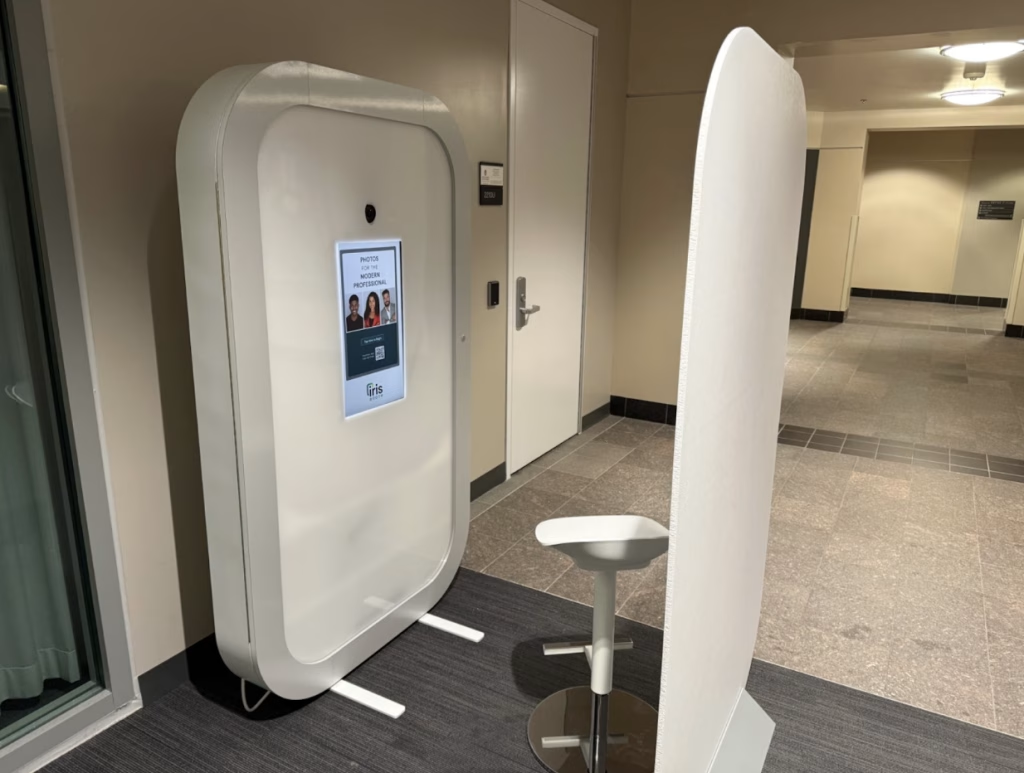
The Iris Air photo booth is now available for WSB employees, students, and the campus community. It is located on the second floor between the central elevators and the Learning Commons, just above the West Atrium.
The Iris is available any time Grainger Hall is open. Simply press the touch screen to begin and follow the prompts. Each session takes about 4-5 minutes and your photos are delivered instantly via email. We ask that WSB students and employees use their wisc.edu email address when signing in.
Need help getting started? Want a walk through? Just a quick question? Email wsbirisadmins@office365.wisc.edu.
Tips and tricks for a great shoot
- If you need to move the stool, please make sure it’s back between the marked pieces of tape after your session.
- Before you take your picture: Adjust the stool to the height that’s comfortable for you. Leave some space between the top of your head and the top of the frame.
- Center yourself in the frame. Eyeglasses may need to be removed if there is a significant glare.
- When taking a picture: Look at the camera (the black circle above the screen) and not the touchscreen.
- One feature we’re currently testing is a transparent framing guide to help users align themselves in the frame. What you see in the frame on screen is true to your finished photo.
FAQ
Can I retake my picture?
Yes. Each photo session consists of three photographs. You can elect to retake one during the session. There is limited retouching available at the booth. There are filters and other editing tools you can use in your personal Iris account once you receive your pictures.
Is there any cost associated with the booth?
No. Headshots are free.
Do I need to make a reservation?
No. Individuals can use the booth anytime the building is open. Occasionally, it may be reserved for groups and unavailable for walk-ins.
I would like to reserve a time for my student org to use the booth. How do I coordinate that?
If you have a group (5+) you’d like to bring to the booth please email wsbirisadmins@office365.wisc.edu to make a reservation.
How long are my pictures available?
Images are available in your Iris Air account for one year. Download your images to your device to save them.
Can people outside of WSB use the Iris Air?
Yes. The booth is available for students, employees, alumni, and visitors to Grainger Hall.I have a question about something else. Who can I reach out to?
Email WSBIrisAdmins@office365.wisc.edu with questions.